
Table of Contents
Rogue is a Vanguard character released in Marvel Rivals Season 5.5. As a melee-focused tank with powerful close-range combos, Rogue doesn't require complex crosshair designs. Most of her abilities and basics are straightforward, which don't need elaborate aiming assistance. Below is a simple crosshair setup specifically designed for Rogue that provides clean guidance without unnecessary clutter.
Note: While these settings work well for most Rogue players, feel free to adjust them to match your personal playstyle.
Best Rogue Crosshair in Marvel Rivals

Rogue's best crosshair is a simple center dot design. Since she's a melee character whose abilities revolve around close-range combos and dashes, there's no need for complex crosshair elements. Here's what the crosshair provides:
- Center Dot: A clean, simple dot that helps you center your aim. This dot serves as a reference point for targeting enemies.
While some players use a crosshair with additional lines to gauge dash range, this can make the screen feel crowded. Once you play Rogue for a while, you'll naturally get used to the distance of her dashes without needing visual indicators. The simple dot design keeps your view uncluttered and lets you focus on executing combos and timing your abilities.
Rogue Reticle Code
Here's the code you can copy into Marvel Rivals:
| 1;0;6.0,100.0,0.0,30.0;100.0,0.0,100.0,100.0;50.0,100.0,0.0,0.0;100.0,45.0,100.0,100.0;0.0,0.0,0.0,0.0;33.0,92.0,0.0,33.0;1.0;100.0,0.0,100.0,100.0;0.0;5,3,1,1;0.0,0.0,0.0; | 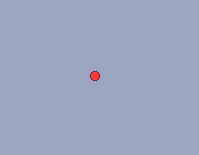 |
Crosshair Settings
| Setting | Value |
|---|---|
| Reticle Type | Dot |
| Reticle Animation | Off |
| Dot Width | 30 |
| Crosshair Width | - |
| Circle Width | - |
| Dot Opacity | 100 |
| Crosshair Opacity | - |
| Circle Opacity | - |
| Dot Outline Width | 0 |
| Crosshair Outline Width | - |
| Circle Outline Width | - |
| Dot Outline Opacity | 100 |
| Crosshair Outline Opacity | - |
| Circle Outline Opacity | - |
| Dot Blur | 0 |
| Crosshair Blur | - |
| Circle Blur | - |
| Crosshair Radius | - |
| Circle Radius | - |
| Crosshair Length | - |
| Crosshair Angle | - |
| Dot Color | Personal Preference |
| Crosshair Color | N/A |
| Circle Color | N/A |
Best Rogue Hero Settings
| Setting | Value |
|---|---|
| Mouse Horizontal Sensitivity | 3-5 |
| Mouse Vertical Sensitivity | 3-5 |
| Invert Horizontal Look | Off |
| Invert Vertical Look | Off |
| Mouse Smoothing | Off |
| Mouse Acceleration | Off |
| Center Mouse in Background | Off |
| Raw Input | Off |
| Allied Health Bars | On |
| Attack Range Hint | ALWAYS ON! |
Why These Settings Work for Rogue
Since Rogue doesn't need to aim projectiles or lead shots, a complex crosshair would only create visual clutter. Her abilities, like Fatal Attraction (dash and pull), Chrono Kick Combo (dash and launch), and Ability Absorption (dash and steal), all have set ranges that you'll naturally learn through practice. Adding crosshair lines to indicate these ranges makes the screen more crowded without providing a significant benefit once you're familiar with Rogue's kit.